Play O.D.I.N. online
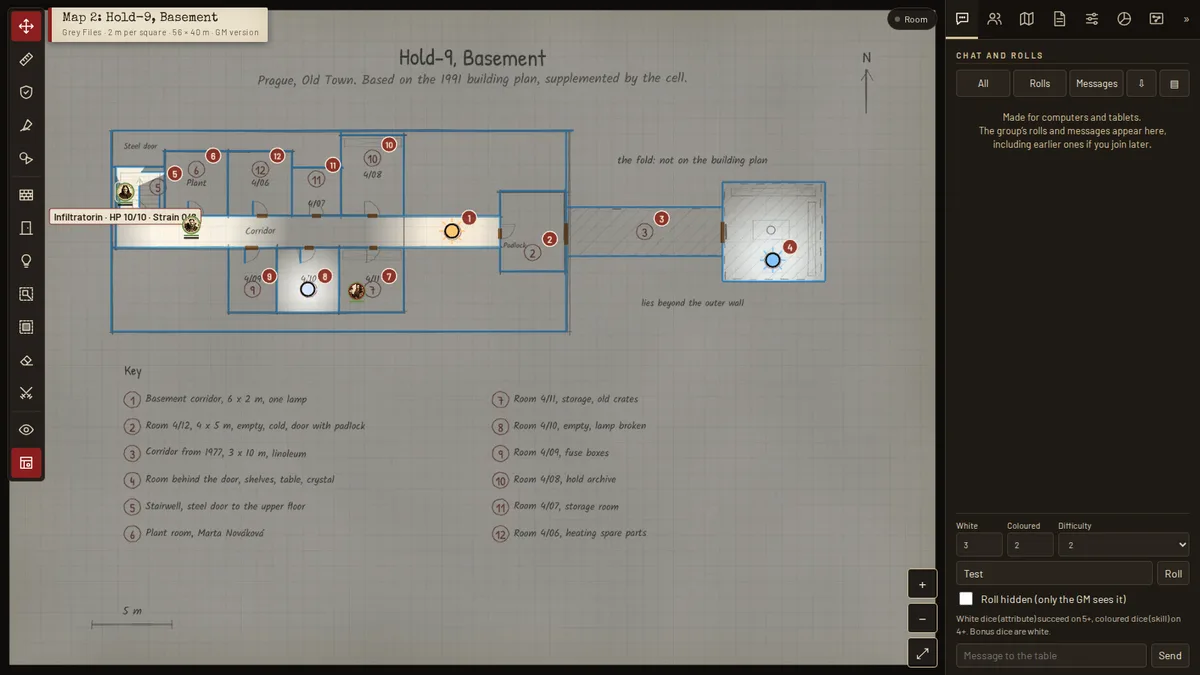
The quickest way is our own table. It runs in your browser and costs nothing, and nobody needs an account. The GM opens a room and sends the invite link, and the group joins with one click. You roll white and coloured dice, hidden if you like, and each player loads their agent from the character generator. In the scenes, walls cast shadows and each agent sees only what they can see from where they stand. On top come redacted case files, an investigation board, progress clocks and the random tables from the books.
Open the table · free, no account, for computers and tablets
O.D.I.N. also runs on the well-known platforms. Foundry VTT has a full game system with sheets, dice, class trees, compendiums and adventures; Owlbear Rodeo has an extension and Let's Role a system, both with arsenal, class tree and the enemies from the Threat Atlas. Agents from the character generator can be imported into all three. Quest Portal has the agent sheet as a template, Realm VTT a ruleset with free modules. Sheets, class trees and compendiums are available in German and English and follow the language setting of your tabletop.
The O.D.I.N. table
Our own virtual table runs right in the browser. Nobody needs an account, nobody installs anything, and the group connects browser to browser with no game server in between. It is made for computers and tablets, and the interface comes in English and German.
- Open a room. The GM opens the table and picks “Open a room for a session” under “Settings”. Copy the invite and send it to the group.
- Bring your agent. Players open the link, enter their name and load their character generator export under “Actors”, “Load agent”, as a file or by pasting. Their stat card appears at the table, and checks take one click.
- Pick an adventure. Under “Scenes”, The Grey Files are set up and ready, with maps, figures and handouts. One click and the scene is on every screen. The maps from the Map Room come along with measured scales.
- Play. The GM places enemies openly or hidden, shows handouts to everyone with one click and lays music and sounds under the scene. Each agent sees only what they can see from where they stand: walls cast shadows, doors open and close. Rolls use a difficulty; rolls and messages land in everyone's log, hidden rolls only in the GM's.
- Point and whisper. A long press on the map or the P key drops a ping that everyone sees. With the pen, each player draws on it in their own colour. The GM can send handouts and messages to a single agent, and the rest of the table sees nothing. Markers such as Strained, Trauma, Unconscious or Dead sit on the figures, and a ring shows the hit points left. Rain, snow, drifting mist, dust, sparks and flickering light set the mood. Progress clocks keep track of deadlines. The random tables from our books roll with one click.
- Pick up later. The session state stays in the GM's browser. To be safe, save it with “Save state as file” under “Settings” and bring it back next time with “Load state”.
Your own maps from Dungeondraft and other tools come in as .dd2vtt or .uvtt files, walls, doors and lights included. The table is new: if something sticks, tell us on Discord.
To see whether people play, the table, the Owlbear extension and the Foundry system send an anonymous count when a session starts: only platform, language and date, no IP address, ID or cookies (see Privacy).
Veilrift: O.D.I.N. as a board game
Veilrift is the co-operative board game from the world of O.D.I.N., for one to six players aged 12 and up, with no game master; a game takes about 90 minutes. The agents travel across the Situation Map, draw encounters and gear up at the Bases. Where a rift has opened, they go down into a Hold and close it, room by room on a square grid. Veilrift is the English edition of Schleierriss.
To print for the real table: Rulebook (PDF, 35 pages, 7.8 MB) · Game material (PDF, 63 pages, 34.7 MB). Free.
More about Veilrift · Play Veilrift in the browser, at one device or online.
Foundry VTT
All on one page: O.D.I.N. for Foundry VTT, with installation, video and screenshots.
Video: O.D.I.N. in Foundry VTT (about three minutes: a skill check, combat and a psi power).
The game system runs on Foundry version 14 and later. In Foundry go to Game Systems → Install System and paste the manifest URL below.
| Manifest URL |
|---|
https://github.com/davidgerbs-beep/odin-foundry/releases/latest/download/system.json |
- Personnel file in three sheets, laid out like the class sheets from the generator
- Two-colour dice pool (white 5+, coloured 4+), attacks, horror checks, powers and spells
- All class trees from the six class books, with rank, prerequisite and XP checks
- Compendiums: ten ready agents plus the six Nordlicht 1977 agents in their 1947 and 1977 versions, all with portraits, weapons, armour, gear and artefacts, the Arsenal, psi powers, spells, 347 adversaries with round tokens (Threat Atlas, The Registry, adventures) and every adventure as journals with maps and handouts, including The Other Services in English
- Adventures with one click: Quickstart, Grey Files, The Door, The Other Services, Holds of the World, Random Files and Nordlicht 1977 as adventure packs; one import creates journals, adversaries, scenes, tables and folders with every link intact
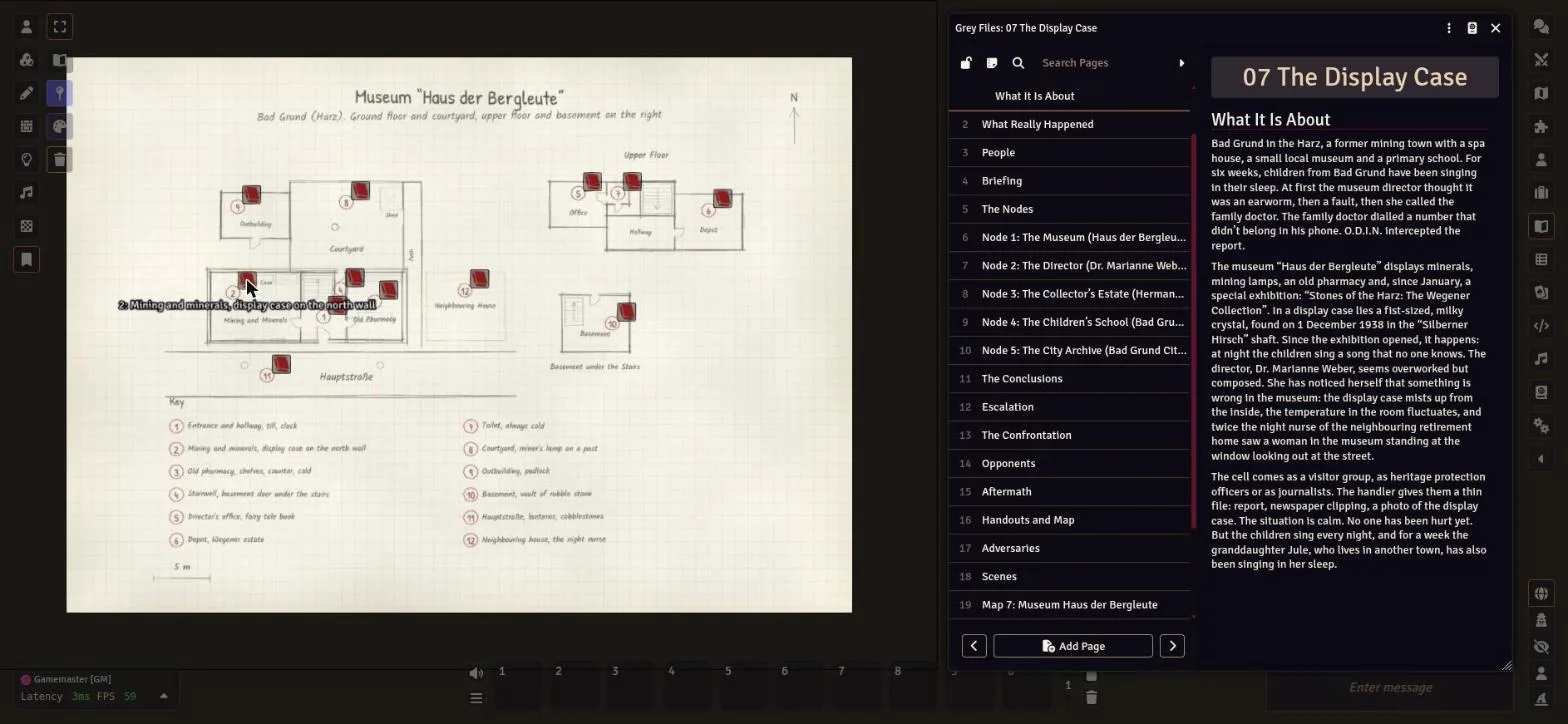
- Scenes with notes: 53 ready-to-play scenes, among them the eight Grey Files maps, the nine Hold floor plans, the twelve Nordlicht 1977 maps and the locations of The Door; every numbered location carries a note that opens the matching journal page, and the adversaries of each Grey File wait as hidden tokens
- Rules compendium: the core rules as eleven journals, from the quick reference to the glossary, readable by players and linked to the roll tables
- 281 roll tables from all books, including the whole Random Files book, rolled with D6 only, plus macros for tests, horror, attacks and random missions and for a whole file, a character, a cult or an artefact from Random Files
The Map Room as a module
The 146 maps from Volume 23 “The Map Room” come as a module of their own, “O.D.I.N. The Map Room”, in German and English. Every map is a scene with a matching grid. Players see the player version without numbers and secret rooms; the game master version lies on top as a hidden tile. In Foundry go to Add-on Modules → Install Module and paste this manifest URL:
| Manifest URL |
|---|
https://raw.githubusercontent.com/davidgerbs-beep/odin-foundry/main/kartenraum/module.json |
Owlbear Rodeo
Owlbear Rodeo has a free O.D.I.N. extension with the agent sheet, the two-colour dice and the material from the books. Owlbear Rodeo runs in the browser; GM and players only need a free account. Every roll shows up for everyone at the table, the roll for the class price only for the GM.
- Personnel file in four tabs with the subclass portrait, boxes for HP, strain, PSI and ME, skills, powers, weapons, signature and career
- Tests, attacks, horror checks, powers and spells, each asking for difficulty, bonus and penalty dice
- Arsenal to pick from: 96 weapons, 31 armours, around 500 pieces of equipment, plus 58 psi powers and 72 spells
- Clickable class tree: the sheet checks rank, prerequisites and XP, deducts the XP and adds the node bonuses to your values
- Token link: right-click your figure, “O.D.I.N.: link to my agent”. HP and strain then show as bars above the token. Mark a target and attack, and its defence and armour are filled in for you; the damage goes to the target.
- Turn order in the “Round” tab: the GM starts the fight, enemies roll their own initiative, players roll on their sheet and appear in the list right away. A gold ring shows who acts, a red one who is down to 0 HP.
- For the GM: 242 enemies from the Threat Atlas with values and dice pools, rolled hidden if you like and placed on the map as a token with HP in one click. Plus the adventure packages (see below): create a map as a scene, show a handout to everyone. The location notes from the books are already in place, visible to the GM only, and the enemies stand at their starting positions.
- Central for the GM: six mood filters over the whole scene (sepia like an old file, trail camera, rift, fog, crystal, night by torchlight) and telexes that type themselves out for everyone at the table.
- Import from the generator: click “Import” and choose the exported file. Gear, advances, bought nodes and career come along.
- German and English, switchable at the top right
| Install link |
|---|
https://odin-rpg.pages.dev/owlbear/manifest.json |
How to install: in Owlbear Rodeo open your profile, go to “Extensions”, click “Manage” and then the plus, paste the link and add it. When you create a room, switch on the “O.D.I.N.” extension. The sheet opens from the compass icon at the top left.
The extension is also listed in the unofficial directory owlbear.rogue.pub and has been submitted to the official Owlbear Rodeo store. It pairs well with Smoke & Spectre! for line of sight and fog over the map, and with Hoot for music and ambience.
Let's Role
O.D.I.N. is also available as a free system on Let's Role, in English and German. Let's Role runs in the browser and is free for GM and players. The sheet has the same tabs and dice as in Owlbear Rodeo, with arsenal, psi powers, spells and class tree to pick from. The roll for the class price is only visible to the GM. The GM gets an “Enemy” sheet: create one, pick any of the 347 enemies and drag it onto the map as a token, with HP as a bar on the token. Picture and token for it are in the enemy package.
| System link |
|---|
https://lets-role.com/system/odin-occult-dynamics-intelligence-network-28559 |
How to start: open the link, sign in, choose “Create a new table” and invite your players. Agents from the generator are imported on the “Dossier” tab: paste the content of the exported file and click “Import”. Gear, advances, bought nodes and career come along.
To try it out, there is a ready demo table with the Quickstart mission, “The House by the Reservoir”. Two scenes, the four agents and the handouts are already set up; the table is in German. Join it with the invite link.
| Demo table |
|---|
https://lets-role.com/join/Q0MvolFLnmoU/nOMrNhDwadDG |
Quest Portal
Quest Portal has the agent sheet as a free template, in English as “O.D.I.N. Agent File” and in German as “O.D.I.N. Agentenakte”. It runs in the browser and has a free tier. Every skill has its own button: it rolls attribute and skill as white and coloured dice, adds bonus dice and counts the successes. Max HP, stress limit, PSI and defence calculate themselves.
| Language | Template |
|---|---|
| English | https://app.questportal.com/template/ODIN-Agent-File-s4jnnrq1ornr |
| German | https://app.questportal.com/template/ODIN-Agentenakte-ht14wsb2f44m |
How to start: open the link, copy the template to your account and create an agent with “Create a character”. You enter the values from the generator by hand, Quest Portal has no import like Foundry or Let's Role.
Realm VTT
On Realm VTT, O.D.I.N. is a ruleset of its own in the marketplace, with the agent sheet in English and German and a sheet for enemies. Realm runs in the browser and accounts are free. The sheet rolls white and coloured d6, counts the successes and shows enemy weaknesses as on the O.D.I.N. table. Every book you need at the table is there as a free module, in English and in German. The adventures bring their maps as scenes with the grid already set:
| Module | Contents | English | German |
|---|---|---|---|
| O.D.I.N. Enemies | 347 enemies with stats, weaknesses, portrait and token | EN | DE |
| The House by the Reservoir | the Quickstart mission: three scenes, two handouts, four ready agents | EN | DE |
| Hop-tu-Naa | the Halloween mission on the Isle of Man: 4 scenes, 2 enemies, four ready agents | EN | DE |
| Grey Files | eight missions for one evening each: 8 scenes, 24 handouts, 22 enemies | EN | DE |
| Nordlicht 1977 | the first team from 1947 to 1977: 13 missions, 12 scenes, 51 handouts, 6 agents in two versions | EN | DE |
| The Door | the campaign in 24 missions: 21 scenes, 28 handouts, 23 enemies | EN | DE |
| Holds of the World | nine bases from London to Cusco: 9 maps, 66 people | EN | DE |
| The Other Services | the opponents in 16 dossiers: 18 scenes, 54 enemies | EN | DE |
| The Registry | 105 index cards of beings: 22 scenes, 105 enemies | EN | DE |
| Roll Tables | 281 random tables from ten books | EN | DE |
How to start: create an account on Realm, make a new campaign and pick “O.D.I.N.” as its ruleset. Get the modules in the marketplace with “Get This Module” and load them in the campaign under “Modules”. The adventure journals are for the GM, who shares the handouts during play. You enter the values from the generator by hand.
Discord
For games on Discord there is a free O.D.I.N. bot: checks with white and coloured dice (/roll), whole case files for the GM (/file), agents (/agent), turn order in combat (/initiative), 281 random tables from the books (/table), stats from the Threat Atlas (/threat) and rules to look up (/rule). Add it to a server or just for yourself, then it works everywhere on Discord.
Adventure packages
Maps, handouts and tokens of the adventures as ZIP files, for Owlbear Rodeo, Let's Role or any other virtual tabletop. The Owlbear extension needs no download: on the “Adventures” tab the GM creates a map as a scene and shows handouts to the whole table with “Show to all”. The adventures themselves are in the books. For The Map Room the extension puts the game master version on top as a hidden layer; players only see their version.
| Adventure | Contents | Package |
|---|---|---|
| Quickstart | 1 map, 2 handouts | ZIP, 325 KB |
| Grey Files | 8 maps, 24 handouts | ZIP, 1.8 MB |
| The Door | 23 maps, 28 handouts | ZIP, 1.9 MB |
| Holds of the World | 9 floor plans | ZIP, 3.7 MB |
| Nordlicht 1977 | 12 maps, 51 handouts | ZIP, 6.0 MB |
| The Map Room I: Adventures | 22 maps, each for game master and players | ZIP, 10.2 MB |
| The Map Room II: Holds and Class Books | 15 maps, each for game master and players | ZIP, 3.7 MB |
| The Map Room III: Adversaries and the World | 20 maps, each for game master and players | ZIP, 5.7 MB |
| The Map Room IV: Sites from the Registry | 23 maps, each for game master and players | ZIP, 7.9 MB |
| The Map Room V: Template Maps (1) | 33 maps, each for game master and players | ZIP, 14.4 MB |
| The Map Room V: Template Maps (2) | 33 maps, each for game master and players | ZIP, 16.2 MB |
Enemies as tokens
All 347 enemies from the Threat Atlas, The Registry and the adventures, each as a round token and as a picture, sorted as in the Foundry compendium. Made for Let's Role, where the GM uploads the picture: on the “Enemy” sheet click the pencil on the picture, browse for the picture from the “images” folder and apply. Let's Role cuts the avatar and a round token from it. For the red ring, upload the round token from the “token” folder afterwards with only the token box ticked. Owlbear Rodeo and Foundry do not need the package, the tokens are already attached to the enemies there.
| Package | Contents | Download |
|---|---|---|
| Enemies | 347 tokens, 347 pictures | ZIP, 23 MB |